Google Calendar
If you are into productivity and planning content at all, I’m sure you’ve heard of Google Calendar! This is my favorite way to keep track of allllll of my plans. While I love using my paper planner for planning and keeping track of my calendar as well, I find that with my busy lifestyle, I have to keep a digital calendar. I don’t always have my paper planner on me and it’s nice to open the Google Calendar app and quickly add a new event or reference an upcoming event!
*Bonus: Google Calendar allows you to color code your events however you want. You can choose from their standard color options OR add in your own by choosing from the color wheel. This is what helps to make it aesthetically pleasing!

Notion
I always love checking out new project management tools. Some of the ones I’ve tried are Asana, monday.com, Trello, and Evernote. While they all have their own cool features, once I found out about Notion, I have been hooked! Side note: I use monday.com for work, and LOVE it, but they don’t offer any personal plans at this time. To me, Notion is the most minimal option which allows more room for customization.
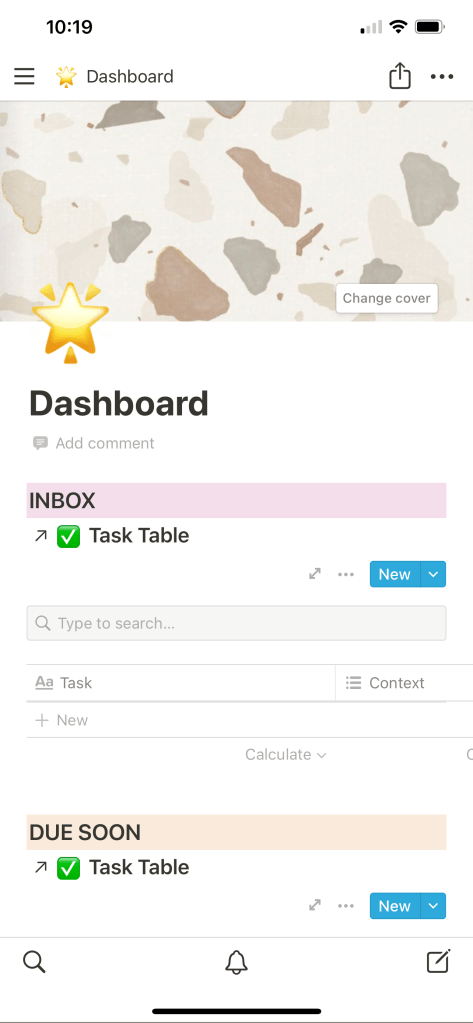
I can expand on my thoughts about Notion in a future post, but for now I wanted to highlight some of the ways I like to use it when I am on the go and need to quickly access the app on my phone.
Ways I like to use Notion on the go:
- Jotting down quick notes into my ‘Inbox’ area
- Checking my content calendar to see what I have coming up in the next week
- Adding a new content idea to my content list
- Referencing notes from the past
Reminders
I try not to use too many notetaking and ‘tracker’ apps because I find that the more I have, the more scattered my information is, which makes it that much harder to stay organized. The Reminders app has earned its keep on my phone because of the beautiful widget option. I like to keep my current 3-5 to do’s on the Reminders app, because it allows me to see them on my home screen without even clicking into the app. I don’t keep my ‘master list’ of to do’s in here because that is already in Notion – but seeing my current to do list right in front of my face helps me to remember what is currently most important! I keep it at the top of my screen for easy visibility.

Google Drive
This is where I store all my files. I pay for a monthly subscription for 1TB of storage because to me, it’s worth it to have everything in a cloud system rather than keeping everything on physical hard drives that I have to carry around with me.
The reason I love having this app on my iPhone is because it makes it super easy to share files across devices, similar to AirDrop. Although I love Apple products, such as my iPhone, I still love the Windows interface for computer work. Because of this, I can’t use AirDrop to sync files across my devices. For example, for this blog post, I took a screenshot of my home screen so I could show you how I like to display my to do’s in the Reminders app widget. I took the screenshot and uploaded it to Google Drive so I could quickly insert it into this post. I find myself using it all the time and highly recommend if you also can’t use AirDrop across all of your devices.
LastPass
When it comes to productivity, one thing that can slow us down is….. passwords. I have tried so many methods for keeping track of my passwords over the years. My husband is in the IT world and he introduced this *life-changing* app to me. I used to just use the same password for everything because it was easy to remember – but then I was enlightened how if one password is leaked in a data breach, it makes it that much easier for the hacker to access my other accounts. YIKES!
I’ve also tried storing passwords on paper, but if I lose that list, I’m in trouble. The way I stored my passwords most recently was through my different web browsers, like Google Chrome. That’s a better option in my opinion but I still feel like it’s risky since it’s not very secure.
LastPass allows you to store all of your passwords in one place, in an encrypted format, which basically means it’s next to impossible for a hacker to figure out your password even if they hacked into your account. Once your passwords are stored, you can use Face ID or a pin to fill in your login credentials for all of your accounts. No more wasting time trying to remember your password or spending the time to reset it!
These 5 apps have been essential for me to maintain my productivity goals throughout the week. Do you have an app that you can’t live without? Let me know in the comments!
 let’s get orrganized - planning & organization blog